
A high-performing DMS: quality document management for companies

Quick reply
Indexing, OCR, validation workflows and legal archiving: the features to expect from a DMS, and the key steps to roll one out.



Companies face ever greater volumes of documents to process, share, archive and secure. Without the right tool, that information quickly becomes difficult to manage, and a source of risk.
This is where document management comes in, through a DMS (Document Management System), which makes going paperless easier, keeps things secure and smooths out processes.
In this article we set out why putting a platform like this in place has become unavoidable, which key features it has to offer, and how to get the most out of it in managing your company's documents. At the end, you will find out why NetExplorer is the DMS to suit your needs.
What is a DMS and why adopt one?
Defining the DMS: managing, archiving and sharing documents
A DMS is a software solution that centralises, organises and secures all of a company's digital documents on a single platform. More than a storage tool, a DMS structures and automates how information moves, while guaranteeing that it can be traced and stays intact.
It makes going paperless easier and lets you manage the whole lifecycle of your documents: from creation to electronic archiving, by way of approval and sharing. Solutions such as Zeendoc, Youdoc and NetExplorer answer companies' growing needs.

Common problems without a DMS: lost data, duplicates, delays
Without a DMS, document management tends to rest on inconsistent habits, with significant risks:
- Important documents lost or deleted by accident.
- Duplicated data and inconsistencies between versions.
- Slow searching and overloaded teams.
- A lack of traceability and difficulty proving compliance.
- Greater exposure to cyberthreats and unauthorised access.
For an organisation handling sensitive documents, or documents subject to legal obligations such as invoices, failings like these can have a significant financial and legal impact. A DMS helps remove those weak points while bringing efficiency and reliability.
Benefits: time saved, compliance, traceability
Putting a document management solution in place brings concrete, measurable benefits. It reduces the time spent looking for documents, guarantees compliance with regulations (the GDPR, electronic archiving periods), and ensures every action on every document can be traced.
It also contributes to going paperless across the company, which improves how the organisation is seen and reduces its running costs.
Key features of an effective DMS
Automated filing and intelligent indexing
A good DMS has to go well beyond simple digital storage. It offers advanced automated filing and intelligent indexing, which give documents a structure as soon as they enter the platform.
In practice, each file can be filed automatically according to criteria you define. That automation reduces the human error that comes with filing by hand, while speeding up document processes.
Drawing on modern technology, some of it from the open source world, the NetExplorer SaaS solution also lets you automate how tags are applied to a folder, so every file added inherits the tags of the parent folder, and lets you find your documents quickly through an intuitive search.
Fast search, OCR and version management
One of the great advantages of a DMS, compared with conventional office software or open source storage, is the ability to search quickly and effectively across every document stored.
Thanks to OCR (optical character recognition), scanned documents become searchable too. That means you can find a specific piece of information inside a PDF or an image, even where it started life on paper.
Another essential feature: version management. Every change made to a document is recorded, and users can reach the full history of previous versions. If something goes wrong, you can go back without losing data.
Access control, workflows and electronic signatures
At a time when data security and control over usage rights have become paramount, a good DMS absolutely has to offer fine-grained management of access rights.
Each user or group can reach only the documents and information they strictly need. That granular access control, coupled with full traceability of what is done, answers the requirements of numerous standards (ISO, the GDPR and others).
Custom workflows let you automate document approval circuits: requests for review, sign-off by management, legal approval and so on. Those flows can be configured around business rules specific to each company.
Finally, an electronic signature built into the DMS platform simplifies contracting and gives legal security to what you exchange. That feature is particularly useful for companies looking to smooth out their processes while making their signed documents more compliant.
Legal archiving and GDPR compliance
Electronic archiving is not simply a matter of keeping files in a document store. It answers precise legal obligations, particularly for invoices, payslips, contracts and any document with evidential value.
A professional DMS lets you guarantee your clients the integrity, durability and availability of archived documents throughout their legal retention period. It offers timestamping, digital sealing and traceability, all essential if you face an inspection or a dispute.
GDPR compliance also imposes strict rules around managing the lifecycle of personal data: the right to be forgotten, deletion at term, restricted access and so on.
What do companies gain?
Better productivity and collaboration
Document processes run faster, processing times fall, and collaboration between departments, particularly in large groups and SMEs, becomes far easier. The result: teams spend less time looking for information or correcting mistakes, and more on work that adds value.
A DMS platform centralises documents and smooths how they move between colleagues, whatever their department or where they are. In a hybrid working environment, it becomes the common foundation for reaching information in real time.
Lower document management costs
The savings a DMS generates are many: less printing, less filing by hand, less physical storage, and considerable time saved searching for or reconstructing files.
In the short term, those savings are visible within the first few months. In the medium term, they let you rethink how documents are organised with performance and lasting digitisation in mind. Even compared with certain open source solutions, professional DMS software such as NetExplorer offers a quick return on investment thanks to its reliability, its support and its ability to evolve.
Greater security for sensitive documents
Cyberthreats, information leaks and human error are today the main sources of document vulnerability. A modern DMS protects all of your data through several levels of security: file encryption, strong authentication, access auditing and activity monitoring.
For companies handling sensitive documents (HR, legal, financial, medical and so on), those guarantees are essential to protecting their information assets. A platform you control, such as NetExplorer's, is also a bulwark against extraterritorial legislation.

Putting a DMS in place: the key steps
Document audit and defining your processes
The first step in a successful DMS project is a complete document audit. That means identifying the types of document you handle, how information flows, the tools already in use (including business software and open source solutions) and the regulatory constraints specific to your company.
That assessment then lets you define which processes to automate or improve, and identify the features your future DMS most needs. It is also the moment to build your change management plan, in line with how people work internally.
Migrating files and configuring rights
The migration phase is essential. It means transferring existing documents (held locally, on servers, or in other software) to the new DMS platform, while structuring directories, indexes and metadata properly.
Alongside that, access rights have to be defined according to user roles, confidentiality rules and approval circuits. Getting that configuration right is key to smooth, secure adoption.
Training teams and managing the change
Finally, to make adoption work, users have to be trained in the new ways of working. A DMS, however intuitive, changes working habits profoundly.
Targeted training sessions, user guides and gradual support help remove resistance and get the most out of the tool. It is also a chance to identify internal champions to carry the project forward.
Why choose NetExplorer as your DMS?
NetExplorer, a French software vendor, offers you a sovereign, secure DMS built to answer the needs of cloud for companies around collaboration, online storage and digital document management.
Hosted in France, GDPR compliant and ISO 27001 certified, NetExplorer combines reliability with ease of use.
The NetExplorer DMS stands apart from a conventional one through its collaborative dimension and its high level of security. It lets you not only centralise and organise documents, but also work on them together in real time, annotate, comment and follow versions without losing anything. To keep exchanges secure, NetExplorer offers features such as secure sharing with expiry, single download, delivery receipts and full traceability of what is done.
Finally, unlike other solutions such as Zeendoc or Youdoc, NetExplorer controls its platform entirely, from developing the software to hosting it, which guarantees independence and an optimal level of security.
Do get in touch with a NetExplorer specialist today to discover our collaborative platform and our online file sharing.
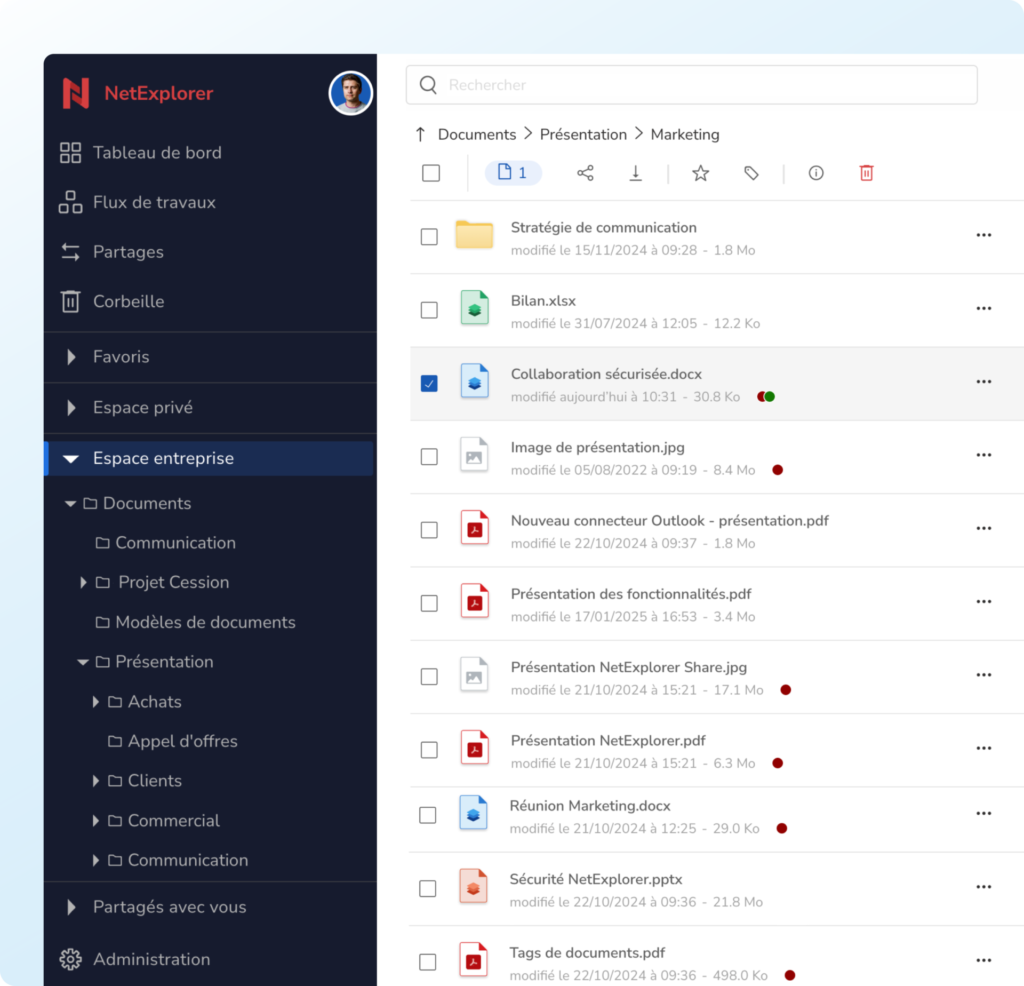
NetExplorer Workspace
The secure collaborative suite for your company files
Share, create, edit, co-edit and review your files together with ease.
NetExplorer Workspace gives you a highly secure environment for storing your company files and collaborating online.
Other articles you might like
How to launch an electronic signature project in your company
Objectives, signer identification level, signing context: the three questions to settle before choosing an eIDAS-compliant solution.




But let's be honest, our cloud-based file storage and sharing solution is much easier.